

• We’re seeing performance issues in the latest app version on some phone models. In certain cases, this may cause missed calls and reduce blocking quality. Our team is already working on a fix. If you have any helpful information about this issue, please email us at info@callfilter.app

    The fix is ready, and update 1.32.6 will be available soon.

"Voicemail payload not available yet, try playing audio."

Winfried

New member
Hello,

I don't know if it's specific to the Xiaomi+HyperOS phone I got some weeks ago, but at this point, I got this notification twice:

"Voicemail payload not available yet, try playing audio.", with phone=Unknown.

The voicemail is spam.

1. Is it a new way to by-pass apps like CallFilter?
2. How can I prevent those fake calls?

Thank you.
 
Hello,

I don't know if it's specific to the Xiaomi+HyperOS phone I got some weeks ago, but at this point, I got this notification twice:

"Voicemail payload not available yet, try playing audio.", with phone=Unknown.

The voicemail is spam.

1. Is it a new way to by-pass apps like CallFilter?
2. How can I prevent those fake calls?

Thank you.
Hello.

This is most likely voicemail / visual voicemail from your carrier, not a normal incoming call in the usual sense. In such cases, Callfilter.app may not be able to handle it the same way as a regular incoming call.

Please try different call handling options in Callfilter.app:
Settings → Expert settings

If you tell me your mobile carrier, I may be able to suggest the best combination of settings for your case.
 
I've only had two notifications like that, both SPAM. I guess they're getting creative.

Carrier is Bouygues Telecom.

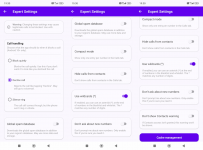
Those are my current settings in Settings > Expert settings:

1772908299454.png
 
I've only had two notifications like that, both SPAM. I guess they're getting creative.

Carrier is Bouygues Telecom.

Those are my current settings in Settings > Expert settings:

Hello,

thank you, this helps clarify the situation.

Most likely this is not a new way to bypass Callfilter.app. What is happening is probably this:

when Call handling is set to Decline call, the blocked call may still be forwarded to your carrier’s voicemail / visual voicemail. In that case, Callfilter.app blocks the call itself, but then the carrier creates a voicemail event, which is a different kind of event and may appear as “Voicemail payload not available yet”.

So for your case, I suggest changing Call handling from Decline call to Block quietly and then checking whether these voicemail spam notifications stop appearing.

Please try this:
Settings → Expert settings → Call handling → Block quietly
 
Back
Top