

You are using an out of date browser. It may not display this or other websites correctly.
You should upgrade or use an alternative browser.
You should upgrade or use an alternative browser.
[SOLVED] Save whitelist in phonebook?
- Thread starter Winfried
- Start date

Hello,
Searching for "save number phonebook" returned no hit.
Apparentely, numbers I enter in CallFilter's whitelist are independent of Android's phonebook.
Is there a way to sync the two lists, or at least one-way export CF → Android?
Thank you.
Hello @Winfried ,
You can enable the Ignore Contacts setting. After that all your contacts in the phonebook will be whitelisted and calls from them will never be blocked. In other words, the phonebook will become a whitelist.
I guess you mean "Skip number in contacts".
Since CF doesn't have it, I sugest adding the following item in the pop-up menu that is displayed when long-pressing a call that's been blocked: "Add to phonebook/contacts".
Currently, the user must 1) copy the number into the clipboard, and 2) manually add the number in the phone's phonebook.
Thank you.
Since CF doesn't have it, I sugest adding the following item in the pop-up menu that is displayed when long-pressing a call that's been blocked: "Add to phonebook/contacts".
Currently, the user must 1) copy the number into the clipboard, and 2) manually add the number in the phone's phonebook.
Thank you.
Attachments
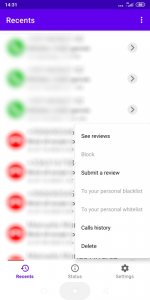
I guess you mean "Skip number in contacts".
That's right! This feature was renamed recently and is now called what you wrote.
Since CF doesn't have it, I sugest adding the following item in the pop-up menu that is displayed when long-pressing a call that's been blocked: "Add to phonebook/contacts".
Currently, the user must 1) copy the number into the clipboard, and 2) manually add the number in the phone's phonebook.
Please specify the app usage scenario. Do you add blocked numbers to your contacts? But why?
It's the opposite: When a legit call comes in (I just got a call from my bank from a new number, so it got blocked; Considering the number and the context, I called it back just to check), I'd like to add it to Android's phonebook so that it's not tied to CF in case I choose to use another application later.
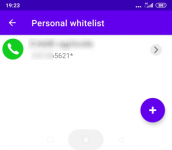
Edit: In the meantime, a wildcard is good enough.
Edit: In the meantime, a wildcard is good enough.
Attachments
Last edited:
It's the opposite: When a legit call comes in (I just got a call from my bank from a new number, so it got blocked; Considering the number and the context, I called it back just to check), I'd like to add it to Android's phonebook so that it's not tied to CF in case I choose to use another application later.
Edit: In the meantime, a wildcard is good enough.
I agree with you completely; this is an excellent use case. I will add this feature to the developers' to-do list, and they will include it in one of the next versions if possible.